01
Profile accuracy
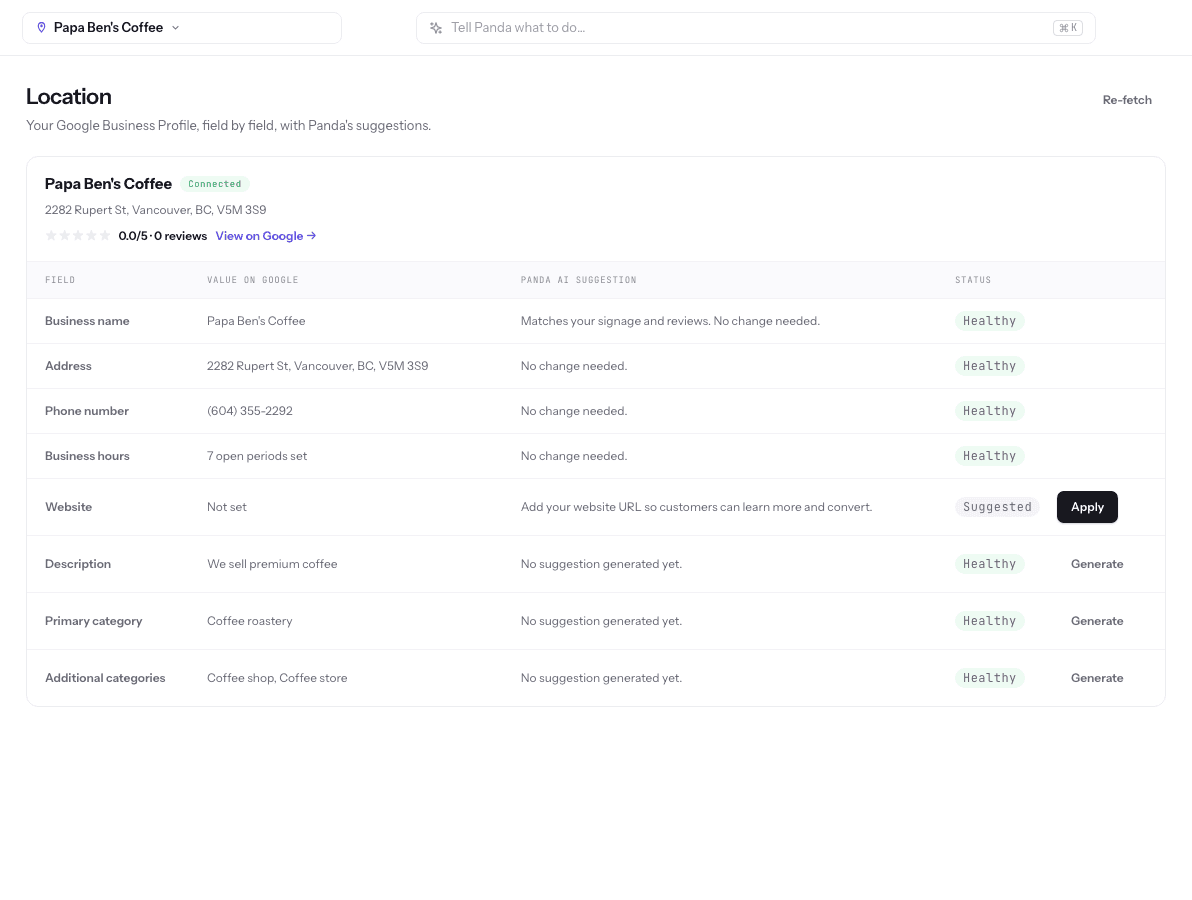
Checks categories, services, hours, holiday hours, and attributes against what you actually offer, and flags anything stale or missing.
LocalPanda checks your profile every week, drafts the posts and review replies, and flags anything out of date. You approve in minutes; the profile stays accurate and active.
An AI agent for Google Business Profile keeps your profile accurate and active without the weekly busywork. It audits categories, services, hours, and photos, flags anything stale, drafts posts and review replies, and queues every change for your approval. You stay in control of what Google shows; the agent makes sure it gets done.
Each one is easy to do once and hard to keep doing every week.
Checks categories, services, hours, holiday hours, and attributes against what you actually offer, and flags anything stale or missing.
Drafts updates, offers, and event posts for your profile, and schedules them alongside Facebook and Instagram.
Drafts a reply for every new review, positive or negative, so nothing sits unanswered for weeks.
Spots thin photo coverage and unanswered questions, and suggests what to add next.
The agent builds on LocalPanda’s Google Business Profile optimization workflow, schedules posts through GBP, Facebook, and Instagram scheduling, and keeps multi-location details consistent with listings management.
Most owners finish setup and the first approvals in one sitting.
Link your Google Business Profile and confirm the business name, address or service area, phone, and website the agent should treat as the source of truth.
The agent reviews categories, services, hours, photos, posts, reviews, and Q&A, and lists the gaps in priority order.
Review the drafted fixes, the first post, and replies to recent reviews. Edit anything that is not quite right, then approve.
Each week the agent re-checks the profile, drafts new posts and replies, and flags changes such as an expired offer or upcoming holiday hours.
An illustrative scenario showing what the agent finds and drafts. It is not a customer result.
What the audit finds. Holiday hours from last year are still set, there is no “Emergency dental service” listing even though the practice keeps same-day slots, the last post is five months old, and three reviews have no reply.
What the agent drafts. Corrected holiday hours for the coming season, the missing emergency service with a short description, a post explaining what counts as a dental emergency and how to get a same-day appointment, and three review replies.
How the replies stay safe. A five-star review gets: “Thank you for the kind words. Our whole team appreciates you taking the time to share this.” The drafts never confirm that the reviewer is a patient or mention treatment, which matters for healthcare privacy rules.
What the office manager does. Confirms the hours, tweaks one reply, and approves the rest. Next week the agent checks the profile again and drafts the next post.
The agent is built to keep your profile compliant, not to game it.
Not sure where your profile stands? Start with the free GBP audit, draft a single post with the free GBP Post Creator, or add Maps rank tracking with the local SEO AI agent. Prefer people doing it? See done-for-you Google Business Profile management or AI SEO services.
AI can handle most of the routine work: auditing the profile, flagging stale information, drafting weekly posts, and drafting review replies. A person should still confirm business facts and approve changes, because Google expects the information to be accurate and only you know your real services and hours.
Using AI is not what gets profiles suspended. Suspensions usually follow policy problems such as keyword-stuffed business names, fake addresses, or misleading information. An agent that only publishes accurate, approved changes keeps you on the right side of those rules.
Yes. LocalPanda drafts a reply to each new review, matching the tone and situation, and you approve or edit it before it is posted. For healthcare and legal businesses, replies should never confirm that the reviewer is a client or mention their situation.
Once a week is a sensible rhythm for most local businesses. Regular, genuine posts such as job photos, offers, seasonal tips, and events keep the profile looking active to customers. The agent drafts one each week so the habit does not depend on memory.
A GBP AI agent focuses on the profile itself: accuracy, posts, reviews, photos, and Q&A. A local SEO AI agent adds Google Maps rank tracking across your service area and uses those rankings to decide which profile and website work to do first.
Yes. LocalPanda’s 3-day trial starts with a free Google Business Profile audit, so you can see the gaps and the first week of drafted work before paying. You can also draft single posts with the free GBP Post Creator.
Start with a free GBP audit during the 3-day trial, approve the first batch of fixes, and let the agent keep the profile current.