01
Start the 3-day trial
Choose Get Started for Free on this page and create your account.
See where your business ranks on Google Maps from 25 points across your service area, not just from your own phone. LocalPanda shows who outranks you at each point and turns the gaps into weekly tasks. Your first GeoGrid scan is free in the 3-day trial.
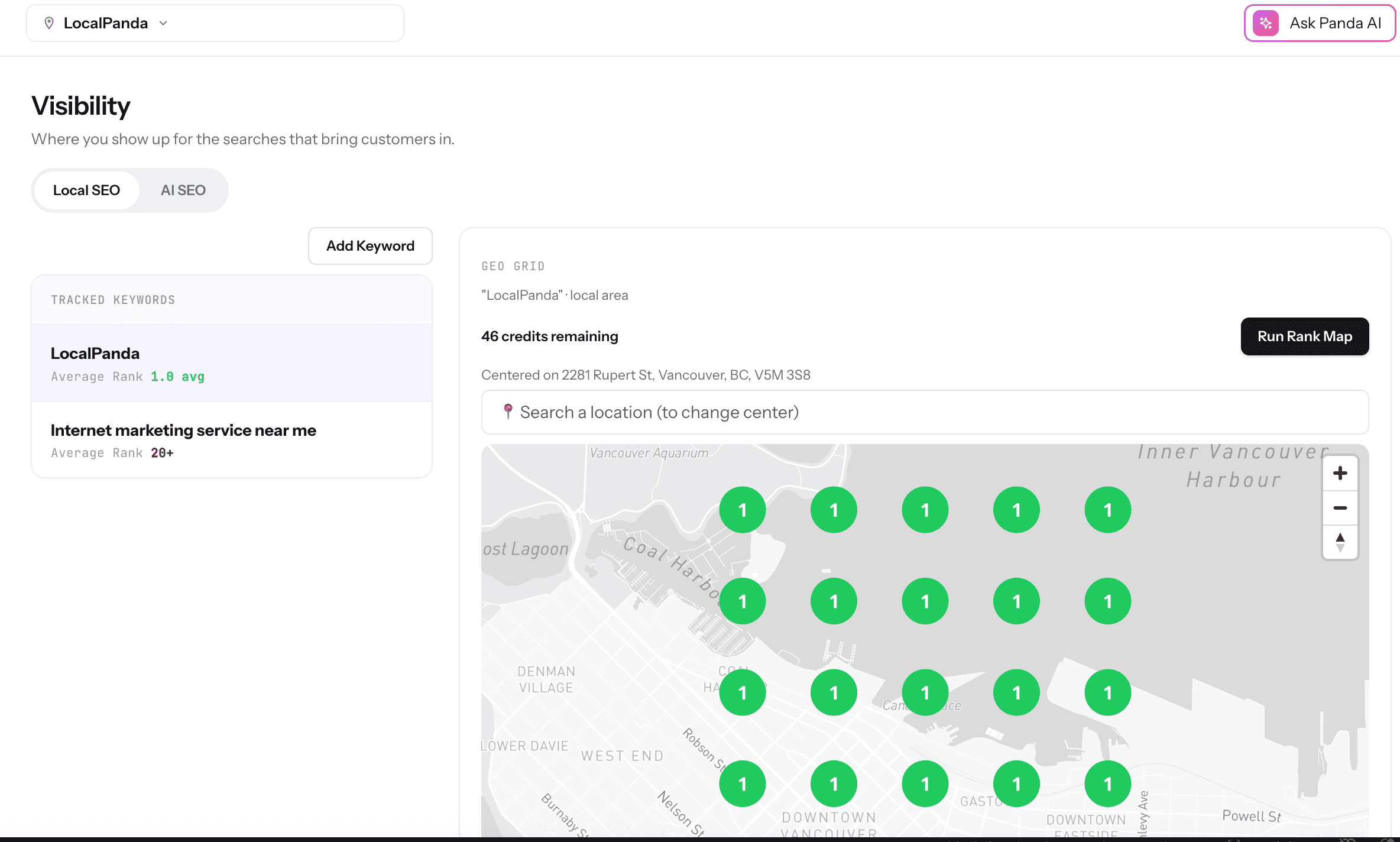
Google local rank tracking means checking where your business shows up on Google Maps for a keyword, from many points across the neighborhoods you serve, and repeating that check over time. A LocalPanda scan searches from 25 points on a 5×5 grid, about 1.5 miles apart, and records your position and the competitors ranking at each one. The tool that does this is a local rank tracker, also called a local rank checker, Google Maps rank checker, or GMB rank checker (Google My Business is now Google Business Profile). LocalPanda then turns the gaps it finds into prioritized Google Business Profile work each week.
Use the Local Rank Tracker as the Local SEO baseline, monitor AI Search visibility, schedule content across GBP, Facebook, and Instagram, and prioritize accurate Google Business Profile optimization.
A baseline is your starting line. It records your rank for one keyword at each point on a grid, on a known date, before you change anything. Without it, you can't tell whether the work you do next moved anything, because you have nothing to compare it with.
Run it before you edit your Google Business Profile, change your website, or hire anyone. If you already started, run it today. A late baseline still beats none.
The GeoGrid scan runs inside the LocalPanda app, so you sign up first. The 3-day trial covers it.
Choose Get Started for Free on this page and create your account.
Use a phrase your customers actually type, such as "roof repair" or "emergency plumber", not your business name.
In the app, the scan checks your rank at 25 points (a 5×5 grid, about 1.5 miles apart) around your location and shows the competitors at each one.
Note the date, keyword, and grid. You can only compare two scans fairly when they use the same grid.
Want a wider first look? The free local SEO audit checks your Google profile, reviews, website, and AI search answers. Its map rank comes from the center of your city, so it is a different measurement from a grid scan. To see how our scans work and where they fall short, read how LocalPanda tracks rankings.
Every scan uses the same settings, so any two scans of the same keyword compare cleanly.
| Grid | 5×5, or 25 search points |
| Spacing | About 1.5 miles (2.4 km) between neighboring points |
| Area covered | About 6 miles (9.6 km) across, centered on your business |
| Recorded at each point | Your Google Maps position (1 to 20, or 20+) and the competitors ranking there |
| When scans run | Whenever you start one. Each scan uses 50 credits, and Panda AI includes 750 credits per location a month |
| Trend | Each keyword’s latest scan is compared with the one from a week earlier |
Each point shows where you rank for that keyword if someone searches from that spot. Read it in this order:
A grid measures visibility, not calls or revenue. Check those in your Google Business Profile performance data and your booking records.
Brandon’s agency used LocalPanda’s rank tracking across tree trimming, HVAC, and plumbing campaigns.
Read the Texas case studyDarren’s agency tracked and improved a ranking in a highly competitive legal market.
Read the legal case study


5.0 out of 5verified customer rating
“Really happy with LocalPanda so far. They've made it much easier to manage our Local SEO and AI SEO (GEO) without having to figure everything out ourselves. What I like most is that it's not just another software tool. Their team is actually hands-on and helps with the work, which makes a big difference. Great option for businesses looking to improve their visibility on Google and AI search.”
Review on Trustpilot
“Fantastic service with a top-notch product. This solution meets our needs, and we feel lucky to have found it.”
Pros: Fantastic customer support with quick responses. We are confident LocalPanda will enhance our clients' local search visibility and rankings.
Cons: We have faced no challenges so far. They've even gone the extra mile to assist us in resolving some GMB-related issues to improve one of our client's situations which was much appreciated.
Verified review on Capterra, GetApp and Software Advice
“Excellent service and an amazing product. We have had every request and expectation met. We are truly blessed to have found this product.”
Pros: Great customer service and fast response. The company has helped us grow and be more efficient at helping our customers succeed.
Cons: Nothing, it's been great. As a new company that's growing you usually hear a lot of excuses but not by this one. Localpanda is on top of it and regularly checks in to make sure we are succeeding.
Verified review on Capterra, GetApp and Software Advice
Capterra, GetApp and Software Advice reviews constitute the subjective opinions of individual end-users based on their own experiences and do not represent the views of Capterra, GetApp or Software Advice or their affiliates.
Use the same keyword, center point, and grid every time. Google Maps results can shift during a day, so treat a one-position change at a single point as noise. Google says there is no way to request or pay for a better local ranking, and nobody can promise you a result on a date.
Re-scan and compare with the baseline. Fix what you can see first: categories, services, photos, hours, and unanswered reviews. Early scans mostly tell you whether the basics are done.
Look for a pattern, not a single point. If the same neighborhoods stay weak, check who ranks there and add service-area content and steady posts aimed at those places.
Compare all three scans side by side. A scan shows that something moved, not why, so match the changes to the work you did. Then keep going, change keywords, or get help.
At week 12, compare LocalPanda plans if you want the scans and weekly tasks to continue. If nobody on your team has time for the work, Panda Managed is our team doing it for you, billed monthly.
Google's Map Pack ranks businesses based on relevance, distance, and popularity relative to each searcher, so the same keyword can put you in the top 3 in one neighborhood and off the map two miles away. Checking your ranking from one browser tells you almost nothing about how you actually show up across your service area. Local Rank Tracker measures multiple keyword-and-location combinations so you can see the real pattern, not one snapshot.
The method stays the same: one keyword, one center, the same grid each time. What changes by industry is which searches to split apart and where to put the center. Google measures a hidden-address business from its verified base, and a storefront from its door. The examples below are hypothetical, with illustrative keywords, not customer scans.
Clinics rank from their own address, and Google allows separate profiles for public-facing practitioners. Track the clinic listing and each practitioner listing patients can reach.
Center the scan on: The clinic, plus a second center in the area you want clients from.
Reading it: Treatment searches such as Botox often pull in dermatology practices, so a gap there is not always a med spa competitor.
Next: Match profile services to the booking menu, then rescan each treatment.
Med spas tracking guide →Center the scan on: Each location where patients are seen, one grid per location.
Reading it: A #1 listing can still send patients to an old hospital page. Check where each ranking profile links.
Next: Map every clinic and physician listing before changing any of them.
Gastroenterology tracking guide →Center the scan on: The practice. Routine-care patients rarely travel far.
Reading it: Implant searches often reach farther than “dentist near me”, because people travel for treatments.
Next: Add missing treatments and emergency hours, then rescan monthly.
Dentistry tracking guide →These businesses work at the customer’s property and usually hide their address. Google still measures distance from the verified base, so listing extra towns does not move the grid.
Center the scan on: Your verified base, then the suburb that sends the most jobs.
Reading it: Showing for drain cleaning but not emergency work at the same points often comes down to hours.
Next: Make your hours match when you answer the phone.
Plumbing tracking guide →Center the scan on: Your verified base, scanned before and during each season.
Reading it: A drop across the whole grid at season start can be competitors getting busier, not a profile problem.
Next: List heating, cooling and heat-pump work as separate services.
HVAC tracking guide →Center the scan on: Your base for residential work, and a business-district center for commercial keywords.
Reading it: An empty EV charger grid next to a strong general grid usually means the service isn’t listed.
Next: Add each real job type as its own service.
Electrical tracking guide →Center the scan on: Your base, plus each town where replacement jobs come from.
Reading it: Storm-chasing competitors appear for a few weeks after hail. Compare several scans before calling it a trend.
Next: Add permitted project photos from the towns you want to grow in.
Roofing tracking guide →Center the scan on: Your base, then a second center on the suburb you want work in.
Reading it: A full grid at the base and an empty one in the target suburb is a distance gap. More service areas won’t close it.
Next: Build area pages only where you have real local jobs to show.
Pest control tracking guide →Center the scan on: Your base for residential work. Scan commercial districts separately.
Reading it: If carpet cleaning outranks house cleaning, check which service your primary category leads with.
Next: Make the category, services and homepage agree on the core service.
Cleaning tracking guide →Customers drive to you, so the shop pin is the ranking point and most of the useful detail is within a short drive.
Center the scan on: The shop, plus the busiest commuter road you sit on.
Reading it: A chain winning brake searches around your shop is a services-and-reviews comparison, not a distance one.
Next: List each repair as a service and keep Saturday hours exact.
Auto repair tracking guide →Go deeper on three of these: how to track med spa Google Maps rankings, why pest control ranks nearby but not across suburbs, and how to measure a GI practice's local search visibility.
Every tool below runs grid scans of Google Maps. The differences are how you pay for scans and what happens after one finishes.
| Tool | Starting price | How scans are paid for | Grid scans | After the scan |
|---|---|---|---|---|
| LocalPanda | $29/mo for one location | 750 credits per location a month; a 25-point scan uses 50 | 5×5, 25 points about 1.5 miles apart | Drafts the profile fixes, posts, and review replies as weekly tasks |
| Local Falcon | $24.99/mo for 7,500 credits | One credit per map pin; 100 free credits at signup | 3×3 up to 21×21, scheduled or on demand | Heatmap reports and AI analysis; you do the work |
| BrightLocal | $41/mo, or $31/mo billed annually | Per plan, one location; more locations cost more | Local Search Grid plus a classic rank tracker | Reports, citation and review tools; you do the work |
| Local Viking | From $20/mo | Per location, with agency tiers | Scheduled GeoGrid scans with history | GBP posting, review, and reporting tools for agencies |
| Whitespark | Local Ranking Grids from $10/mo | Separate products; Local Rank Tracker is $14 to $200/mo | Ranking grids plus a separate organic and local rank tracker | Citation building and reputation tools, sold separately |
Scroll the table sideways to see every column.
Pick a specialist scanner if you already have someone who acts on the data. Pick LocalPanda if you want the scan and the follow-up work in one place. Each tool name links to our full side-by-side comparison.
Both matter for local visibility. They answer different questions.
| Question | Local Rank Tracker | GeoGrid Rank Checker |
|---|---|---|
| What it shows | Ongoing rankings for the keyword-and-location combinations you track | A visual grid of one keyword's ranking across the streets around a single location |
| Best for | Monitoring visibility and trend over time, across your whole service area | Seeing the street-by-street pattern around one address at a point in time |
| Competitor view | Yes, at each tracked keyword and location | Yes, at each grid point |
| Use it when | You want a recurring view of your real visibility, not a one-time check | You want to see exactly how far your visibility extends from one location |
Use both together: Local Rank Tracker for ongoing monitoring, and GeoGrid Rank Checker when you need the visual street-by-street view for one location. Choosing a tool? Read how LocalPanda tracks rankings and where grid scans fall short.
Real product screenshots, the same ones used across LocalPanda's product pages.
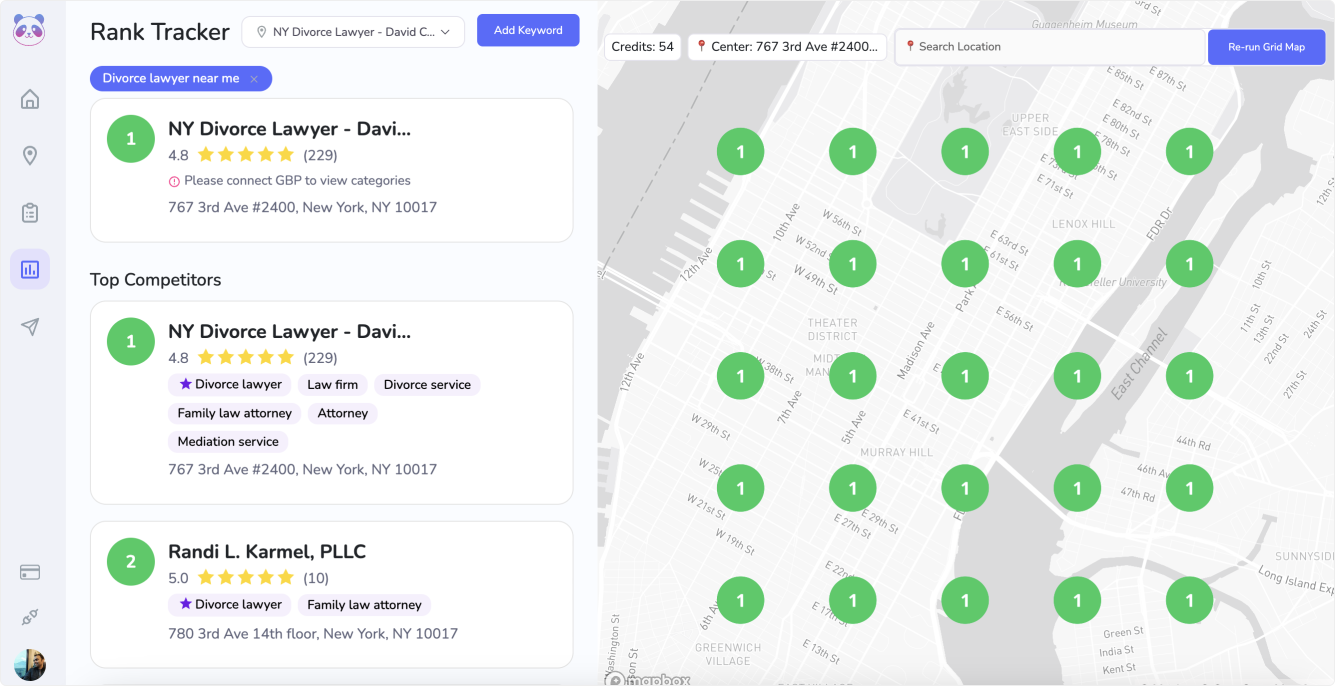
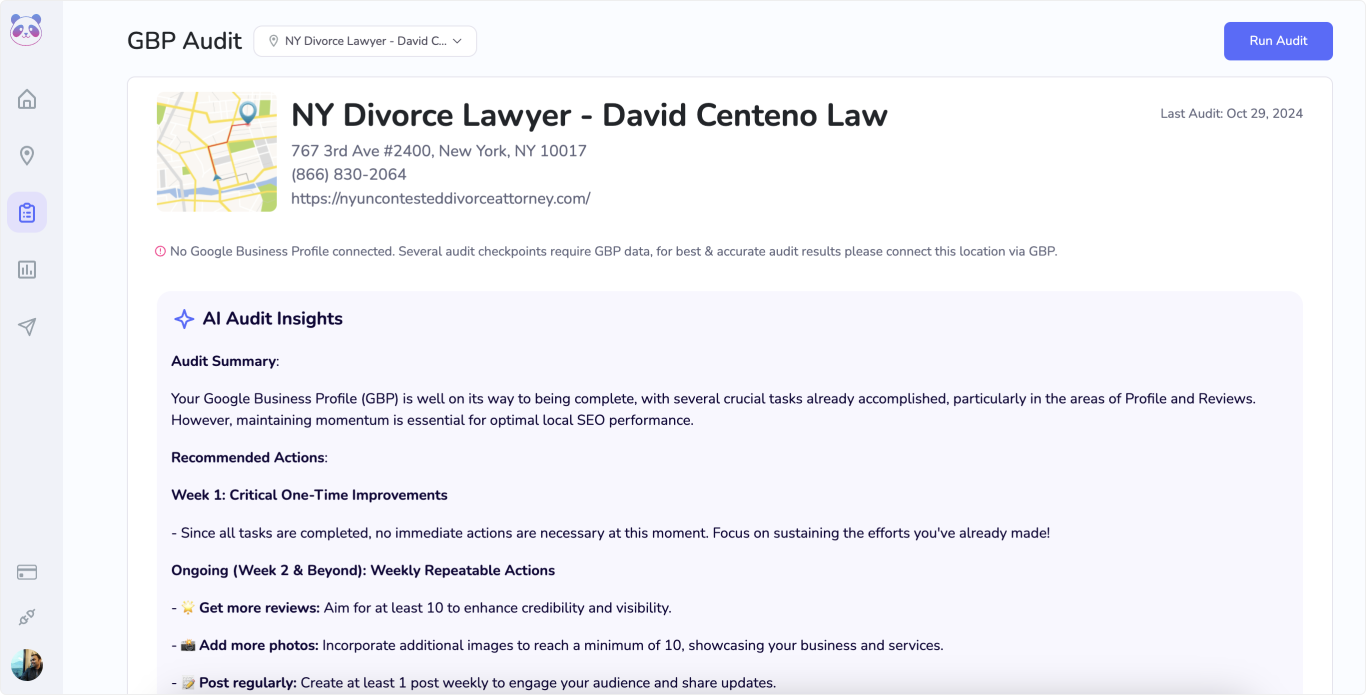
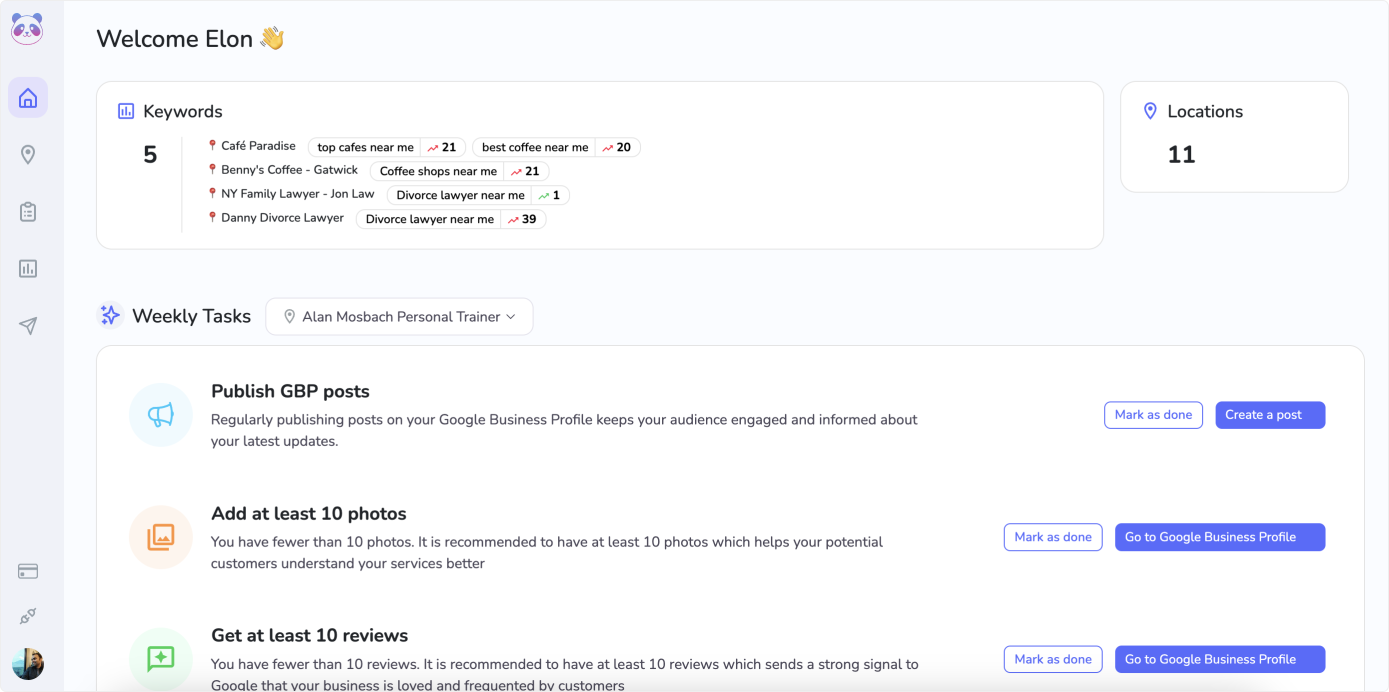
Knowing a keyword dropped is only useful if something happens next. A standalone tracker stops at the report; LocalPanda connects the same tracking to the work that follows.
| When a ranking drops | Rank-tracker-only tools | LocalPanda's connected stack |
|---|---|---|
| You find out | Yes — a report or dashboard alert | Yes — the same neighborhood-level tracking |
| You find out why | Usually not — you investigate manually | Cross-referenced against your GBP profile, reviews, and content for likely causes |
| A fix gets drafted | No — that's on you or a separate tool | Yes — a GBP fix, review request, or content page gets queued as a weekly task |
| Content and reviews are tracked too | Rarely — most rank trackers are single-purpose | Yes — GBP, social scheduling, and AI search visibility are part of the same workflow |
Neither approach is wrong. A specialist rank tracker is enough if your team already has a process for acting on what it finds. If ranking data tends to sit in a report nobody acts on, a connected stack closes that gap, and the local SEO AI agent turns each scan into drafted weekly fixes. Compare specialist tools in the Local Falcon and Local Viking alternative pages.
A core update reaches your Maps ranking only through the website your Google Business Profile links to. Core updates are broad changes to how Google assesses web content, while local results are mainly based on relevance, distance, and popularity. The update does not move your pin or your reviews.
That makes the useful test a comparison. If organic rankings for your linked page fall and your GeoGrid weakens with them, the website is the likely cause. If organic rankings hold while the grid moves, look at your profile, your reviews, or new competitors instead.
For scan-focused buying, compare Local Falcon alternatives and Local Viking alternatives. If an owner needs help acting on the data, use the small-business software guide. To track answer engines beside Maps, compare AI local SEO tools.
A local rank tracker shows neighborhood Maps gaps; a weekly local marketing agent turns those gaps into approved GBP, social, and review work, plus AI Search Visibility checks. See AI marketing agent for local businesses (Maps + AI visibility + execution, not ads autopilot).
Start with a free Google Business Profile audit during your 3-day trial and get a prioritized weekly plan.
Rather have our team do it? Our team + AI agents, from $199/mo →